AdSense Beginner’s Frequently Asked Questions
What is AdSense?
In short, AdSense is a free, simple way to make money by placing ads on your site.
Google’s ad network connects advertisers looking to run their ads on the web with publishers like you, looking to monetise your website, making it simple for everyone to succeed. AdSense connects publishers and advertisers, giving AdWords advertisers the opportunity to bid on ad space on websites like yours.
By working with an ad network like AdSense, you can spend less time marketing and selling your advertising space and more time focused on creating the best content for your users. Learn more in the AdSense 101 article.
What do I need to sign up for AdSense?
As a site owner, you’ll need pages with unique content that's relevant to your visitors and that provides a great user experience. Before you apply to AdSense, make sure your site's pages are ready by visiting the AdSense Help Center. If you’re ready to turn your #PassionIntoProfit, sign up for AdSense today.
How do I know if I’m eligible to join the AdSense network?
Before applying for an account, make sure that the site you own has been active for at least six months, and complies with the AdSense program policies.
AdSense also works with products such as Blogger and YouTube to allow you to create host partner accounts. To be eligible for a hosted AdSense account via Blogger or YouTube, you must first meet certain eligibility requirements. Learn more about signing up for an AdSense account via YouTube.
How do I monetize my YouTube channel using AdSense?
To start earning money from your video content, you’ll need to apply for an AdSense account to link to your YouTube account. Follow these steps to become eligible to receive payments:
- Make sure your YouTube account is enabled for monetization.
- Submit your application to create a new AdSense account to link with your YouTube account. Once approved, you'll see a "Host account" label on your AdSense homepage.
- If you also have your own non-host site where you’d like to show ads, then you’ll need to submit a one-time application form to tell us the URL of your site (you only need to complete this step if you want to monetize your site, and don’t need to take this action to earn money from your YouTube videos).
How can AdSense help me grow my online business?
AdSense helps you to create a revenue stream from the valuable content you host on your site. AdSense saves you time with a quick and easy setup allowing you to focus on the elements of your business that require your focus.
It’s like an automatic car -- it removes most of the manual adjustments, allowing you to cruise along with less effort. You still need regular “tune ups” to get optimal performance, but you won’t need to shift gears to get from point A to point B.
What is DoubleClick Ad Exchange?
DoubleClick Ad Exchange gives you real-time access to the largest pool of advertisers.The main difference between DoubleClick Ad Exchange and AdSense is that AdSense does a lot of the technical settings and optimization work for you, such as automating the sale of all your ad space to the highest bidder. With DoubleClick Ad Exchange you manage these adjustments yourself, controlling exactly how your inventory is sold.
As an example, DoubleClick Ad Exchange allows you to choose which ad space is for public sale and which is reserved for private auctions. This additional input from you helps you to get the best results from DoubleClick Ad Exchange.
Another important distinction is that through AdSense, demand is primarily from AdWords advertisers, whereas DoubleClick Ad Exchange pulls demand from multiple sources. This means that in addition to AdWords advertisers, you can also access other major ad networks and agencies. Check out the more comprehensive list of differences at our Help Center.
Should I use DoubleClick for my site?
Check out our Choosing the right tools for you article to figure out if solutions from DoubleClick are right for your site.
Can I use AdSense to monetize my WordPress site?
WordPress doesn’t allow advertising on their free hosting plan (WordPress.com). If you’d like to show ads on your WordPress hosted site, then you’ll need to switch to a self-hosted WordPress.org domain. Visit our product forum and learn how to make this switch.
Can I monetize multiple sites under a single AdSense account?
Yes! AdSense allows you to add multiple sites in association to the same account. This will enable you to monitor the inventory on your sites from the same place, saving you valuable time. Here’s how to set up multiple sites on your account:
- Sign in to your AdSense account.
- In the left navigation panel, click Settings.
- Click My sites.
- Click Add.
- Enter the URL of the site that you'd like to add (e.g., example.com). If you're unsure which URL to enter, check the section on formatting the URLs of your sites below.
- Click Add site.
- Your site is added to your site list with a status of "verified".
Check out the Help Center for more info on this!
I’d like help growing my business with AdSense, does AdSense offer performance growth tips?
Yes it does! When setting up your account, simply check the box beside the “I’d like to receive performance suggestions” message.
If you already have an account, go to the Settings tab and check the “Performance Suggestions” box.
If I’m not using AdSense yet, how can I receive performance tips?
Follow AdSense on social media for daily tips on how to optimize your account and product updates; Twitter, Google+, and Facebook.
Also, watch the AdSense Optimization Library playlist on YouTube to learn AdSense best practices, and don’t forget to subscribe to our YouTube channel.
How do I get more traffic to my site?
First, you’ll want to take advantage of the options within Google Search Console to make sure your site is visible for search users. The AdSense Help Center has all the information you’ll need to submit your site for index, diagnose any problems, and identify which keyword queries are driving traffic to your site.
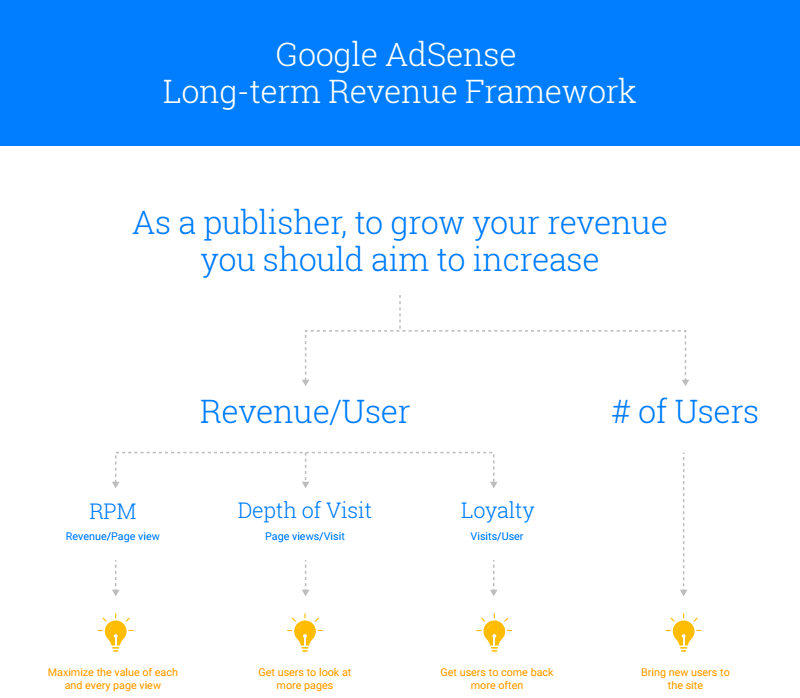
Next, follow the Long-term revenue framework, a tool often used by our AdSense optimization experts, to better understand the four levers that can help you grow and develop your site.
Also, catchy titles are a way of pushing referral traffic from social media platforms, and Brandon Gaille wrote a great guest-blog for us that lays out how to approach naming your content.
Be sure to follow AdSense best practice policies when planning your strategy, to avoid violations on your account. It’s important to know that in order to maintain ad serving on your site and keep an AdSense account active, it's the responsibility of the publisher to keep up to date with, and adhere to, the AdSense program policies.
How do I increase clickthrough rates (CTR) in AdSense?
Please see our recent response to this question on Quora where Symone Gamble shared her best practices.
What are responsive ad units?
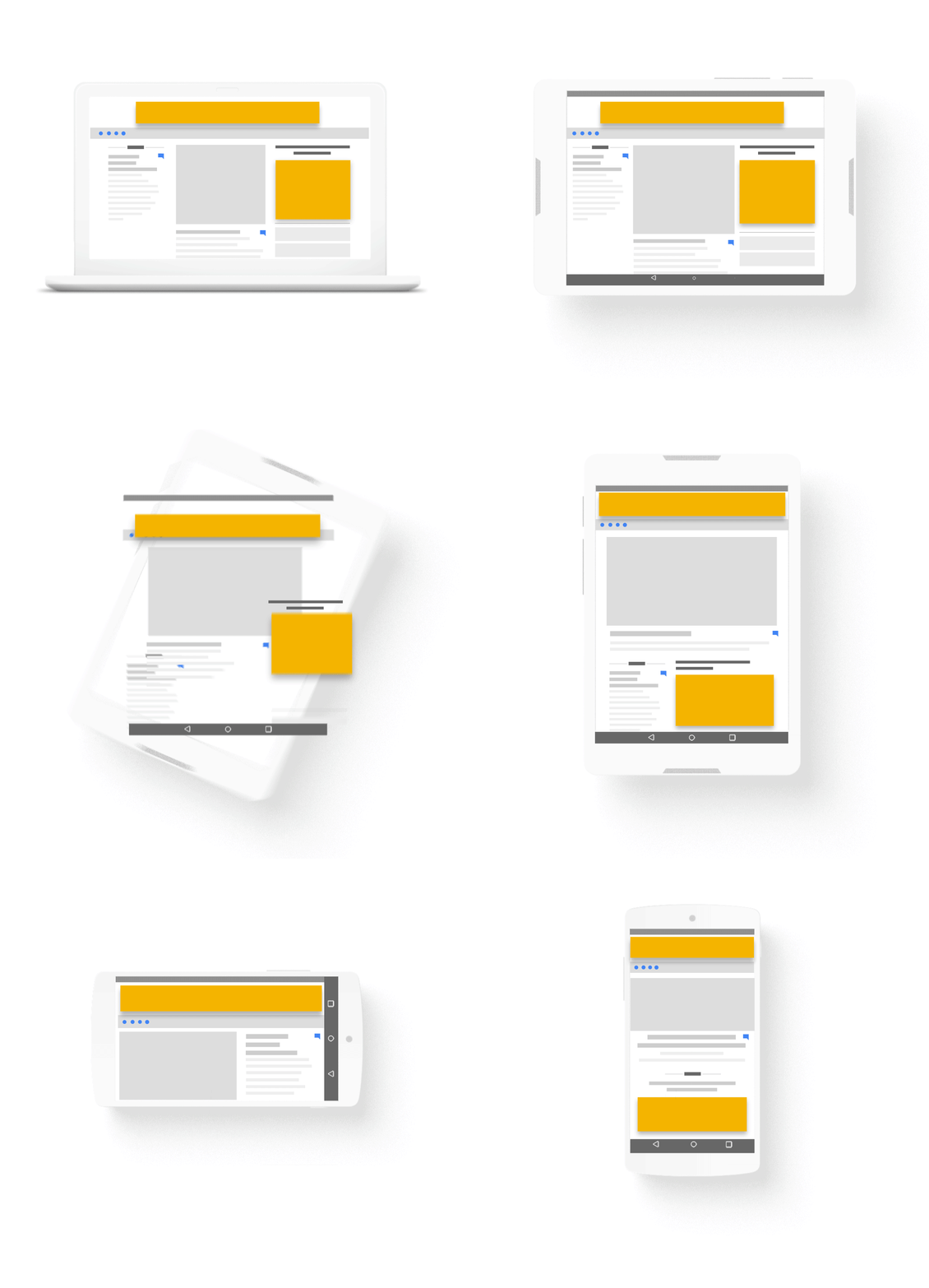
Responsive ad units automatically control the size of your ads using a single piece of ad code. They also allow ads to be resized after a screen orientation change. Using a responsive ad unit will allow your site to show the most appropriate ad size according to your user's device, and will help you to maximize your revenue potential. Learn more about how responsive ad units work and then check out how to customize responsive ads to match the style of your site.
How can I make my site load faster?
Tools like PageSpeed Insights and Mobile-Friendly Test can be used to audit the speed of your site, identify possible problems, and even suggest solutions. From there, follow these 5 tips to improve page speed published on the Inside AdSense blog and then print out the Ultimate Page Speed Infographic for mobile-specific advice.
Why do I have invalid traffic deductions in my AdSense account?
How do I stop my site getting hacked?
HTTPS protocol ensures your servers are talking to who they are expected to be talking to and the conversation cannot be interrupted by anyone else, and that content cannot be altered in transit.
Make sure your software is up to date: this might seem common sense, but up-to-date software means there are no holes or faults that might make you vulnerable to people with a less than honourable intention.
Passwords: Using safe, secure, and complex passwords will protect the security of your site. Avoid words that contain common words, names of friends, family and pets as these are all easily attainable using social media, leaving yourself at risk. Don’t forget to change your password regularly; set yourself a reminder to change your password every few months.
What can I do if a site that I don't own is using my AdSense code?
Since site code is readily available to anyone who inspects your page, it's possible for someone to copy your ad code and paste it on a site you don’t own. In this case, if the ad code ends up on a site that violates the AdSense program policies, your account will receive a policy warning.
To prevent this, site authorization is an optional feature that lets you identify your verified sites as the only sites that are permitted to use your Google ad code.
Learn more about site authorization on the AdSense YouTube channel.
How to stop certain ads from appearing on my site?
The AdSense 101: You’re in control video will show you how to control the ads displayed on your site.
Why is there a decline in my AdSense revenue?
If your earnings have taken a dip, we recommend you check 4 engagement metrics in the performance tab of your AdSense account:
AdSense recently introduced automatic experiments, which allow you to take a back seat as Google runs A/B tests on a small portion of your traffic. To enable the feature, just visit the "Experiments" page on your Optimization tab, and switch on "automatic experiments".
The opportunities generated from these experiments will appear in the “Opportunities” page on your Optimization tab. They'll be labelled "verified by experiment,” so you’ll know they’re backed by data and tailored to your site and users.
Posted by: Jay Castro from the AdSense team
I’d like help growing my business with AdSense, does AdSense offer performance growth tips?
Yes it does! When setting up your account, simply check the box beside the “I’d like to receive performance suggestions” message.
If you already have an account, go to the Settings tab and check the “Performance Suggestions” box.
If I’m not using AdSense yet, how can I receive performance tips?
Follow AdSense on social media for daily tips on how to optimize your account and product updates; Twitter, Google+, and Facebook.
Also, watch the AdSense Optimization Library playlist on YouTube to learn AdSense best practices, and don’t forget to subscribe to our YouTube channel.
How do I get more traffic to my site?
First, you’ll want to take advantage of the options within Google Search Console to make sure your site is visible for search users. The AdSense Help Center has all the information you’ll need to submit your site for index, diagnose any problems, and identify which keyword queries are driving traffic to your site.
Next, follow the Long-term revenue framework, a tool often used by our AdSense optimization experts, to better understand the four levers that can help you grow and develop your site.
Also, catchy titles are a way of pushing referral traffic from social media platforms, and Brandon Gaille wrote a great guest-blog for us that lays out how to approach naming your content.
Be sure to follow AdSense best practice policies when planning your strategy, to avoid violations on your account. It’s important to know that in order to maintain ad serving on your site and keep an AdSense account active, it's the responsibility of the publisher to keep up to date with, and adhere to, the AdSense program policies.
How do I increase clickthrough rates (CTR) in AdSense?
Please see our recent response to this question on Quora where Symone Gamble shared her best practices.
What are responsive ad units?
Responsive ad units automatically control the size of your ads using a single piece of ad code. They also allow ads to be resized after a screen orientation change. Using a responsive ad unit will allow your site to show the most appropriate ad size according to your user's device, and will help you to maximize your revenue potential. Learn more about how responsive ad units work and then check out how to customize responsive ads to match the style of your site.
How can I make my site load faster?
Tools like PageSpeed Insights and Mobile-Friendly Test can be used to audit the speed of your site, identify possible problems, and even suggest solutions. From there, follow these 5 tips to improve page speed published on the Inside AdSense blog and then print out the Ultimate Page Speed Infographic for mobile-specific advice.
Why do I have invalid traffic deductions in my AdSense account?
How do I stop my site getting hacked?
HTTPS protocol ensures your servers are talking to who they are expected to be talking to and the conversation cannot be interrupted by anyone else, and that content cannot be altered in transit.
Make sure your software is up to date: this might seem common sense, but up-to-date software means there are no holes or faults that might make you vulnerable to people with a less than honourable intention.
Passwords: Using safe, secure, and complex passwords will protect the security of your site. Avoid words that contain common words, names of friends, family and pets as these are all easily attainable using social media, leaving yourself at risk. Don’t forget to change your password regularly; set yourself a reminder to change your password every few months.
What can I do if a site that I don't own is using my AdSense code?
Since site code is readily available to anyone who inspects your page, it's possible for someone to copy your ad code and paste it on a site you don’t own. In this case, if the ad code ends up on a site that violates the AdSense program policies, your account will receive a policy warning.
To prevent this, site authorization is an optional feature that lets you identify your verified sites as the only sites that are permitted to use your Google ad code.
Learn more about site authorization on the AdSense YouTube channel.
How to stop certain ads from appearing on my site?
The AdSense 101: You’re in control video will show you how to control the ads displayed on your site.
Why is there a decline in my AdSense revenue?
If your earnings have taken a dip, we recommend you check 4 engagement metrics in the performance tab of your AdSense account:
- Clickthrough rate (CTR)
- Cost per click (CPC)
- Page revenue per thousand impressions (page RPM)
- Page views
- YouTube video: Why are my Google AdSense earnings declining?
- AdSense blog post: Why are my earnings down right now?
- AdSense Help Center: Earnings troubleshooter
AdSense recently introduced automatic experiments, which allow you to take a back seat as Google runs A/B tests on a small portion of your traffic. To enable the feature, just visit the "Experiments" page on your Optimization tab, and switch on "automatic experiments".
The opportunities generated from these experiments will appear in the “Opportunities” page on your Optimization tab. They'll be labelled "verified by experiment,” so you’ll know they’re backed by data and tailored to your site and users.
Posted by: Jay Castro from the AdSense team